Building verification loops in Claude Code with skills
How to turn your manual checks into skills, so Claude closes its own feedback loop.
Most agentic coding sessions follow a loop: you ask for a change, Claude gathers context, takes action, verifies the results, and if needed, loops back to gather additional context.
Verification is how agents check their work before responding. Claude already does some of this from observing the deterministic signals in your codebase, including type checkers, linters, tests, and runtime errors. Whatever Claude can't infer becomes the steps you take to manually check a feature.
These manual steps, however, can be transformed into verification loops. In Claude Code, a verification loop is an iterative process where Claude checks and attempts to fix the work.
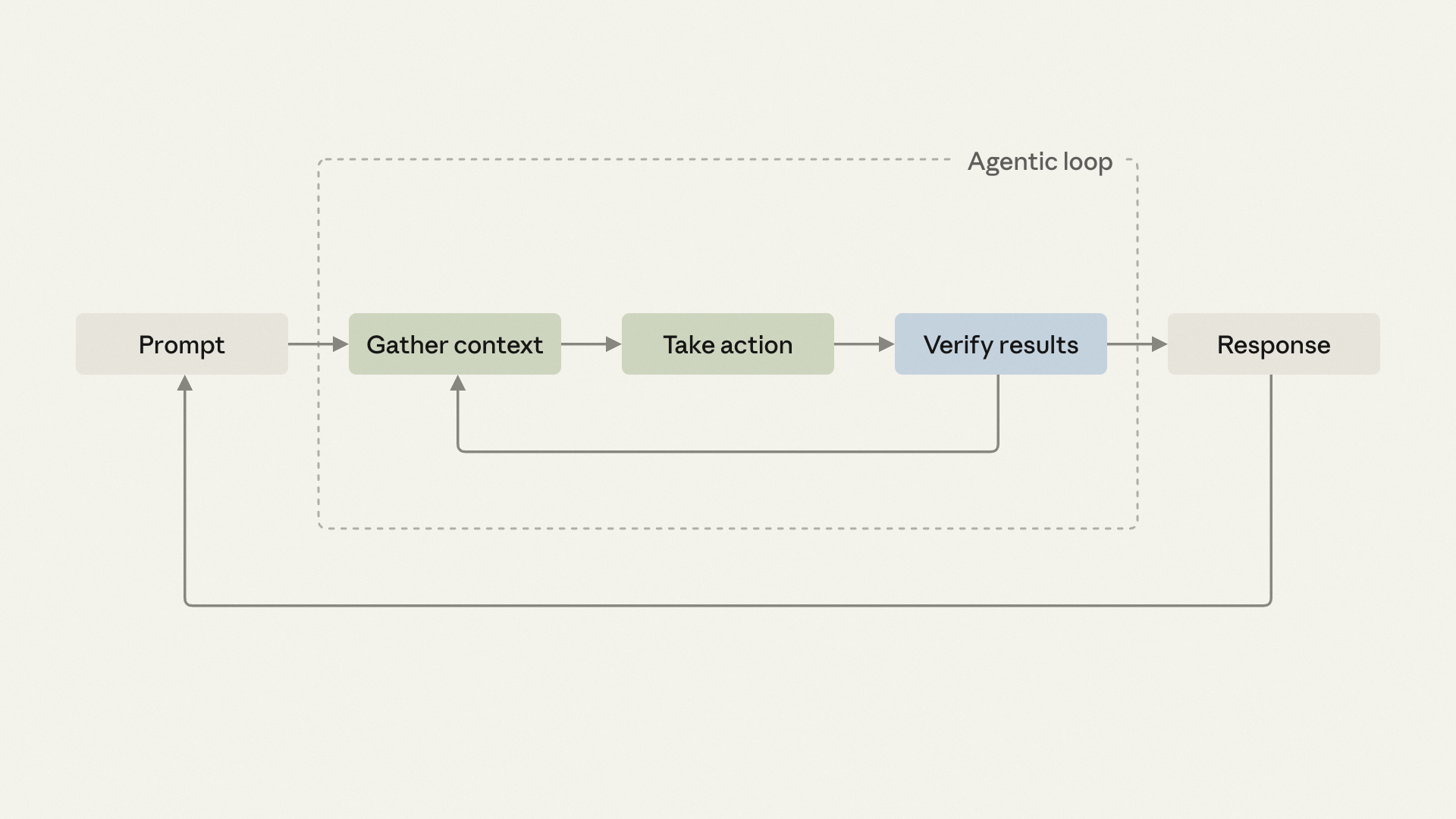
In this article, we cover the most common types of verification loops and show you what we use inside Anthropic. Then we’ll show how to encode the manual checks you already do as skills, so Claude can close its own feedback loop and you can work on something else while it iterates.
New to agent loops? Start with getting started with loops.
What is a verification loop?
A verification loop is a repeating cycle where an AI agent checks its own work — running tests, linters, or custom checks — and fixes what fails before moving on. In Claude Code, verification loops can be packaged as skills, so every session applies the same checks automatically instead of relying on a human to remember them.
Built-in verification loops
Before diving into designing custom verification loops, it can be helpful to understand the built-in support Claude has for a number of different verification loops. Common features and approaches include:
- /verify skill: builds, runs, and observes the changes in your application.
- Toolchain: Claude aims to catch and act on error codes and warnings from any tool you provide such as a linter. A good practice is to list your exact build and test commands in CLAUDE.md so Claude doesn't have to infer them.
- Code Review (research preview): A managed multi-agent service that runs an automated review pass on PRs in the repos you enable. You can manually fix the finding and push, or close the loop by commenting @claude on the finding (if you’ve already set up and configured GitHub Actions, below).
- GitHub Actions: Define a job that invokes Claude with a verification skill, and the same checks you run locally fire on every push or PR.
- Spec validation: A skill that helps verify each change against a markdown spec in the repo and looks to fix violations.
- Rubrics in Claude Managed Agents (beta): A managed agentic service that allows you to verify outcomes against a rubric using a separate grader agent. Failures loop back for rework automatically.
Writing verification loops
When you have an existing project and you find yourself making the same small corrections every time Claude implements a new feature for you, it’s time to turn those steps into your own custom verification loop. The first step is to write down everything that you find yourself doing every time
The same goes if you're starting a new project and need to figure out how the project should behave. Write the best-practices version in plain English, the way you'd hand it to a new teammate on day one.
If you're struggling to articulate the verification check itself, ask Claude for best practices first and edit from there. Your version probably differs on a few specific points, and those differences are exactly what you want to capture.
Pro tip: The check doesn't have to be qualitative to belong here. "Reject any migration that drops a column without a backfill step" is a deterministic rule no generic linter will catch but a project-specific one will. Anything you keep having to enforce by hand as a manual check qualifies for capture as a loop.
Make it a skill
The most common way to encode repetitive steps into a verification loop is to write it as a skill, and the fastest way to create a skill is to install the skill-creator plugin and let Claude interview you:
Example:
/skill-creator Create a skill for verifying frontend changes end-to-end. Interview me about my workflow.You can also hand-write a skill by dropping a markdown file in .claude/skills/ inside your project. The simplest possible verification skill is a few lines of frontmatter plus a body:
# .claude/skills/verify-log-hygiene/SKILL.md
---
name: verify-log-hygiene
description: Check that error logs include the request ID and never
  include the request body. Use when the diff touches error handling
  or logging.
allowed-tools: [Read, Edit, Grep]
---
Read the error-handling paths in the current diff.

For each log call on an error path, confirm it includes the request ID
and does not pass the request body, headers, or any user-supplied payload.

Report each violation with file:line, then fix it: add the request ID
where it's missing and strip the payload from the log call.
The full schema and the philosophy behind it are in our complete guide to building skills.
Match the check to where it runs
The next thing to determine will be how the verification loop kicks off: standalone, embedded, chained, or tied to PR.
Standalone
You invoke it deliberately, after the artifact exists. A standalone skill earns its place for cross-cutting checks that don't apply every time: a pre-commit security scan, a pre-PR accessibility audit, license-header verification across a repo. Anything you want available across many workflows but don't want firing on every code change.
The cost is that each invocation is still a turn you have to remember to take. The signal that you've outgrown standalone is when you're running it after every change. At that point, the procedure has earned a permanent home: embed it or chain it.
Embedded
Fires automatically as part of the producing skill. The check belongs to one specific workflow, and the workflow now runs it without you asking.
The simplest version is a one-line append to the producing skill's body:
# .claude/skills/scaffold-component/SKILL.md
---
name: scaffold-component
description: Scaffold a new React component under src/components/, including the component file, its co-located test, and an index export. Use when the user asks to create a new component.
allowed-tools: [Read, Write, Edit, Bash, Glob]
---

# Scaffold a new React component

Given a component name (PascalCase), create the following under `src/components/<Name>/`:

1. `<Name>.tsx`: function component with a typed props interface and a default export.
2. `<Name>.test.tsx`: React Testing Library test that renders the component and asserts it mounts without throwing.
3. `index.ts`: re-export the default and any named exports.

Follow the patterns in `src/components/Button/` as the reference. Match the import alias style (`@/components/...`) used throughout the codebase.

# code continues...

After creating the component file, run eslint on it and
address any errors before reporting completion.
Verify the embed works by invoking the skill on a fresh task and confirming the new step runs as part of the output. If it doesn't, the skill's description or earlier instructions aren't pulling the appended check in.
Embedded only works on skills you can edit: ones you wrote yourself, or ones installed at a project level where the SKILL.md file is under your control. Built-in skills and plugin-managed skills (the kind that get overwritten on update) are off-limits for this pattern; for those, chain instead.
Skip embedded for checks that span workflows; those want standalone, so you can invoke them from any context.
Chained
One skill calls another at its end, and several verified handoffs run end-to-end.
Members of Anthropic's Claude Code team use this pattern in their day-to-day: /code-review hunts for bugs, /simplify cleans up the diff, a /verify skill confirms end-to-end behavior, and a custom /design skill checks against guidelines in a DESIGN.md file if the change touched UI.
Chaining is also how you add verification to a skill you can't modify: build a custom wrapper skill that invokes the original, then invokes your verification skill, as depicted below:
# .claude/skills/safe-refactor/SKILL.md
Run /simplify on the current diff first.
When /simplify finishes, invoke /verify-no-public-api-changes.
What started as a habit ("I always run /verify after /simplify") becomes a contract ("/simplify always runs /verify when it finishes"). The chain runs the whole dev cycle on its own. You only step in when something escalates back to you.
You can skip chaining when the steps are independent enough that you sometimes want to run one without the others; chaining trades flexibility for automation. Chained verification loops can increase token spend, so it's best to test these loops before deploying them broadly.
On every PR
Once the chain is solid for your own changes, the same procedure can run on every PR. A teammate's change passes the same gates yours did, whether they remembered to invoke the chain or not. The infrastructure is the same kind of thing as the chain you already wrote, one step further along: the same skills, the same rubrics, the same standards, applied without depending on the author's diligence.
This is where verification stops being personal infrastructure and becomes team infrastructure. The check you wrote down to save yourself two minutes a week is now saving everyone two minutes a week, on every change. Hold off on PR-wide gates while the chain is still in flux; every adjustment becomes a team-visible event.
Once you have the process down, you’re ready to expand your loop engineering. The verification loop creation process is consistent, no matter what you’re automating or in what environment:
- Pick the manual follow-up you did most often this week.
- Try out the built-in /verify skill first and see if it helps your process.
- Write the procedure in plain English, the way you'd hand it to a new teammate on day one.
- Hand it to skill-creator, or drop the markdown file in .claude/skills/ yourself.
- Invoke it on a new task and confirm the check runs as part of the output, iterate if needed.
- Experiment with skill chaining to create an end-to-end verification flow.
The more you can encode for Claude to follow, the more often Claude's response will land closer to what you want on the very first try. The corrections you no longer have to fiddle with now free up your attention for the individual and exclusive work that no skill can write down for you.
Get started with verification loops in Claude Code.
This article was written by Delba de Oliveira, a member of the Claude Code team.