How Anthropic's legal team cut review times from days to hours with Claude
Mark Pike, Associate General Counsel, shares how our legal team uses Claude to build workflows that automate repetitive tasks like reviewing marketing content and redlining contracts—no coding required.
There's a comically anachronistic vintage payphone on Mark Pike's desk at Anthropic. Tap a "legal challenge coin" against it—yes, really—and it rings. An AI bot answers, figures out what you need, and routes you to the right attorney.
Mark built it. He doesn't know how to code.
"I wouldn't say what I'm doing is learning to code," says Mark, a product lawyer at Anthropic. "I partner with Claude to tackle certain projects that involve coding, but I am not the one coding. I'm just very good at troubleshooting."
The problem: Drowning in tactical work
Before Claude, Mark's day looked like any other in-house lawyer's. Responding to compliance documents and customer questionnaires. Drafting and updating terms of service and privacy policies. Reviewing blog posts and email copy in the hours before a launch.
"Before Claude, I had a ton of tactical busy work," Mark says. "Things I would put off until the end of the day because I just knew it would take a lot of time, but not using the best parts of my brain."
The flow was always the same: get a ping on Slack or an email, pull up the Google document, read it, insert comments, go back to the client to let them know what they need, then do two or three more back-and-forths to get things to a good place.
Anthropic’s Legal team decided to do something about it. They got into a conference room and whiteboarded their pain points: What's draining our energy? What feels repetitive? What prevents us from doing impactful work?
The list was long. Marketing review turnaround that stretched for days. Contract redlining that ate up hours of manual comparison. Privacy impact assessments that followed similar patterns but required recreating formats from scratch. Even physical mail triage.
"The goal was to turn the legal team from 'the department of no' into cross-functional thought partners," Mark explains. "When legal teams get excited about AI, we stop being the blocker for wider adoption. Other teams see what we're doing and they realize they can do it too."
The solutions: Four workflows in action
Over the course of several months and lots of experimentation, some of the legal team's biggest pain points have evolved into repeatable workflows.
Marketing review workflow
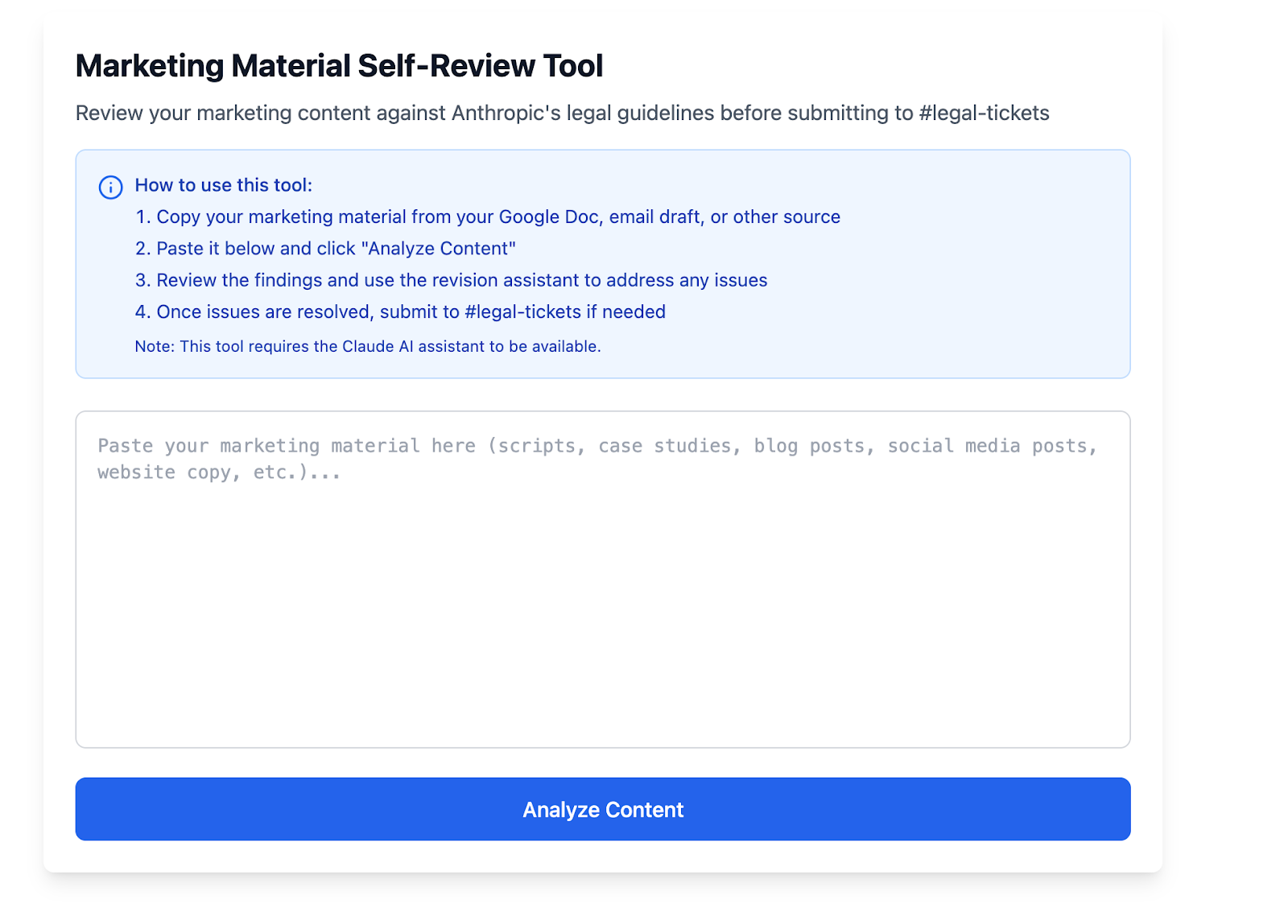
The Legal team's Marketing Material Self-Review Tool allows go-to-market employees to self-review their own content before sharing with Legal for a final pass.
The problem was familiar to any legal team supporting marketing: last-minute blog post reviews with tight turnarounds.
The solution Mark and his team built is a self-service review tool pinned in Slack. Marketers paste their content, and Claude analyzes it using a "skill" (a file containing the legal team's historical guidance and review framework). The tool identifies issues like publicity rights concerns, overstated claims, and statistical accuracy problems, flagging them as low, medium, or high risk. It suggests fixes before the marketer even submits a ticket.
"It flags things like 'Hey, do you have rights to this logo? Is this statistic accurate? This trademark needs a symbol,'" Mark explains. "Once you've done that, submit a ticket in the legal queue."
When content does get submitted for formal review, it's triaged to the right lawyer with pre-flagged issues. Since implementing this tool in their queues, turnaround dropped from two to three days down to 24 hours.
"I still read the blog post. I'm still reviewing the work," Mark notes. "But this is helping us move with more speed."
Contract redlining tool
Comparing contract versions and suggesting fallback language is time-consuming work.
Claude now compares document versions in tools like Google Docs and Office 365, highlights changes, and recommends language from the commercial playbook. Team members figured out how to have Claude work inside Google Docs, commenting with suggested edits in real time. Someone reviewing a contract can ask directly in the document: "Hey Claude, do you think this language would meet our needs?" and get immediate feedback.
"Contract redlining is the use case everybody expects from AI," Mark says. "And Claude's really good at it – it saves us hours of manual comparison."
Mark and his colleagues also write Skills – specialized instructions and best practices stored in files Claude reads depending on the task – to further streamline the review of specific types of documents, from NDAs to third-party vendor agreements.
Outside business activity review
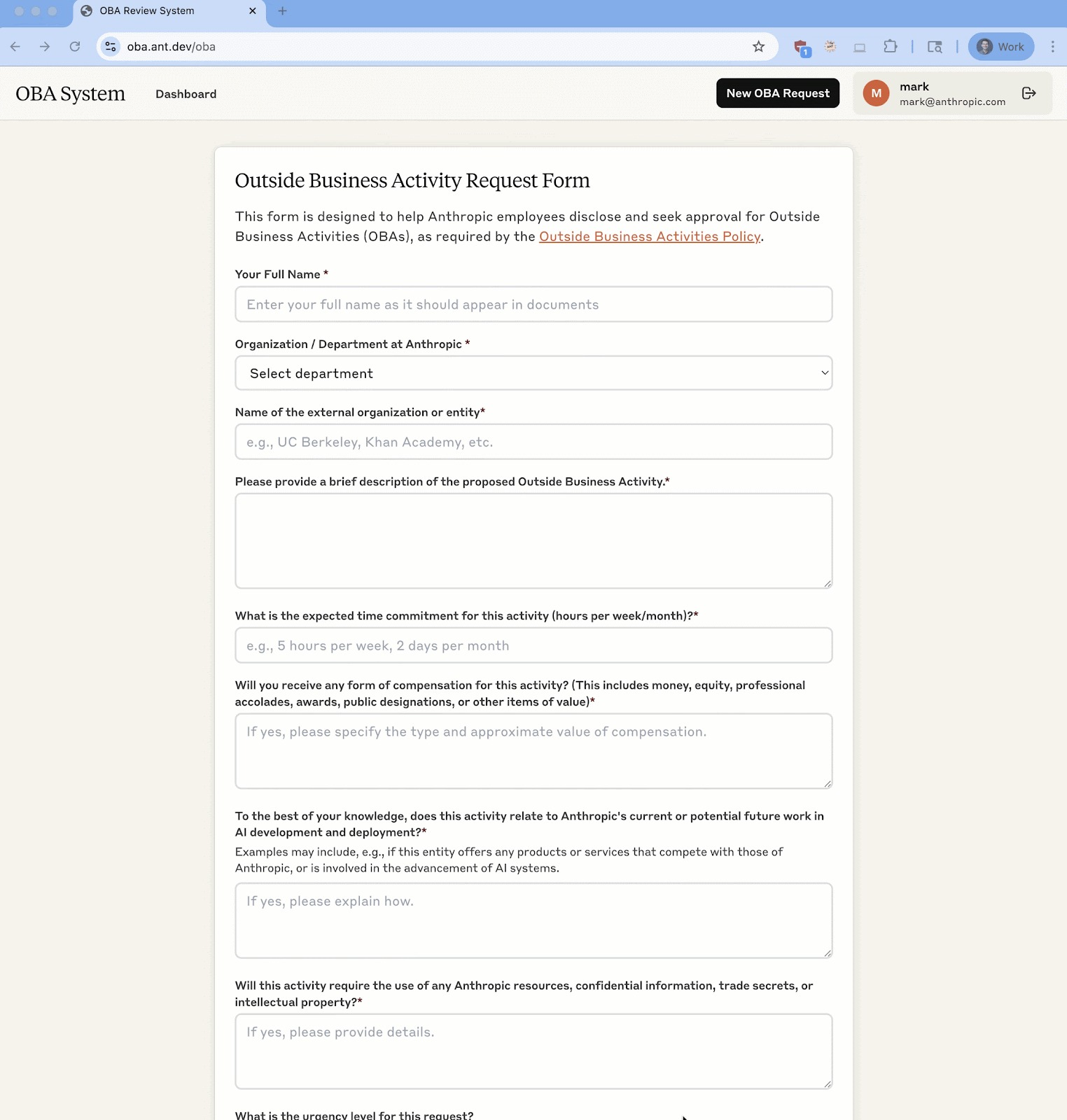
The Legal Team's Outside Business Activity Request Form expedite the process of assessing conflict-of-interest reviews for Anthropic employees.
At Anthropic, if an employee wants to consult or join a nonprofit board, they fill out a form to clear conflicts. Employment lawyers were spending significant time on routine conflict-of-interest form reviews.
Their Claude-powered workflow has employees fill out a form with their department, manager, and description of the proposed activity. Claude analyzes submissions against the COI policy framework and sends recommendations to lawyers via Slack for approval.
"It used to be that you'd have to interview employees with a bit of back-and-forth to figure out the details and what conflicts might exist. With this workflow, Claude reads the form, asks for more information if it needs to, and suggests an outcome," Mark explains. "Then it goes to our queue with a recommendation."
Privacy impact assessments (PIAs)
Writing privacy impact assessments from scratch was tedious, even when they followed similar patterns. The team now uses MCP (Model Context Protocol) servers to connect Claude to a Google Drive folder of previous PIAs and a Skill to instruct Claude on format and concerns.
For instance, a lawyer might ask Claude to write a new PIA based on a folder of previous ones.
"Claude is so good at reading that context and using that skill to create a new template and help me move on with my day,” Mark says.
Best practices for using Claude for legal work
Mark's experience offers practical guidance for lawyers and legal professionals adopting AI.
Start with pain points, not technology
Ask yourself: what’s the busiest work we're dealing with? What's draining our energy? What feels repetitive? "Don't start with 'what can AI do?'" Mark advises. "Start with 'what do we wish we didn't have to do?'"
Use natural language to describe what you need
"The first time I saw Claude Code, it looked like something from the Matrix," Mark recalls. "Lines of code scrolling by, intimidating at first glance. But then I just typed a normal sentence, describing what I wanted. And it worked."
Build in human oversight
AI can still hallucinate. Always verify citations and outputs. Use AI for the first pass, triage, and drafting, not final judgment. Mark's workflows route to lawyers for approval, not around them. "We know that AI systems can still hallucinate, and we want to make sure that we're verifying and checking citations to make sure the AI is not making things up."
Use Skills for consistency and voice
Skills are files containing instructions, scripts, and resources that Claude loads dynamically when relevant to a task. They package expertise into reusable workflows that make Claude better at specialized tasks.
Mark uses Skills in two ways. First, for workflow consistency: his marketing review skill contains the legal team's guidance, helping Claude identify issues and coach marketers on how to fix them before submitting to legal.
Second, for voice and writing style: Mark had Claude analyze ten of his recent memos to learn his formatting preferences and what he typically includes in a product legal brief. Now he can upload a product roadmap into a Claude project, invoke his skill, and get a first draft in his voice.
Different skills serve different specialties: employment, commercial, privacy, corporate. A skill can teach Claude to write like an employment lawyer or format memos the way a product lawyer would.
Leverage MCP to connect your knowledge sources.
MCP allows you to pull information from other systems into Claude. The Anthropic legal team uses MCP to connect Claude to Google Drive, JIRA tickets, Slack messages, and Google Calendar. Pulling in all this information means surfacing the right context at the right time.
The bigger picture
Mark envisions a future where new lawyers inherit their team's accumulated knowledge through prompt libraries and skills. Instead of reading through old memos to learn the house style, a new hire could invoke a skill that teaches Claude how to write like the team's product lawyer or format board minutes the way the corporate group prefers.
"We're not replacing lawyers," he says. "We're pushing out the frontier of what's possible. We're empowering them with the skills and tools they need to get their best work done."
Get started with Claude for Enterprise today. Stay tuned for more stories in the "How Anthropic uses Claude" series.